Happy Green: A Vibrant Serif for Modern Design Projects
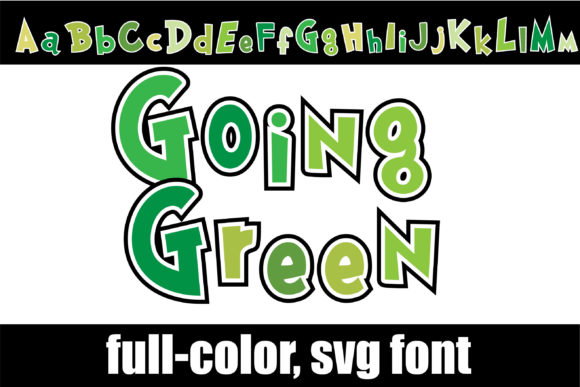
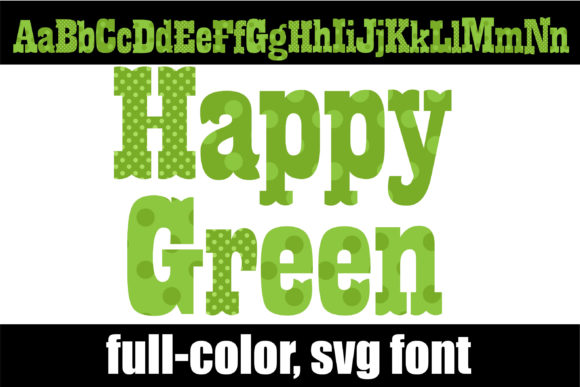
Imagine a typeface that doesn't just convey words but also communicates a specific mood and energy. Happy Green is that font—a full-color, heavy serif that injects immediate vitality and organic warmth into any creative project. Its unique, multi-tonal green palette offers designers a powerful tool for creating visuals that feel both contemporary and deeply connected to nature, making it a standout choice in a crowded digital landscape.
Understanding the Happy Green Color Font
Happy Green is not your average typeface. As a color font built with OpenType-SVG technology, it renders multiple shades of green directly within each letterform. This creates a rich, textured appearance that traditional single-color fonts cannot achieve. It's a bold design asset that leverages modern typography trends to make headlines, logos, and displays pop with personality. Its heavy serif weight provides excellent readability and a strong visual hierarchy, ensuring your message is both seen and felt.
Key Features and Technical Considerations
This font is engineered for professional graphic design workflows. It's compatible with industry-standard software like Adobe Photoshop and Illustrator, as well as vector-based programs like Silhouette and Inkscape. This makes it a versatile addition to your creative assets library for both digital and print design. However, it's crucial to note that the OTF/TTF files are not compatible with Cricut machines due to their complex color data. For best results, always consult the Ultimate Font Guide to understand the full capabilities and setup process for color fonts.
Practical Applications for Visual Communication
The true value of Happy Green lies in its application. Its distinctive character can elevate numerous design scenarios, enhancing brand identity and user engagement.
- Branding and Logo Design: Use it to craft a memorable wordmark or logo for brands in wellness, sustainability, food, or outdoor industries. The green color palette inherently communicates growth, health, and eco-friendliness.
- Marketing and Social Media Graphics: Create scroll-stopping headlines for digital marketing campaigns, social media posts, and story graphics. Its vibrant look helps content stand out in fast-paced feeds.
- Packaging and Editorial Design: Apply it to product labels, book covers, or magazine spreads to add a touch of modern aesthetics and visual interest. It works exceptionally well for titles and pull quotes.
- Web Design and UI Elements: Integrate it into hero sections, landing pages, or call-to-action buttons for a burst of color. In UI design, it can guide user attention effectively.
- Presentations and Digital Products: Transform slide decks, e-books, or online course materials with a professional presentation that feels curated and engaging.
Tips for Effective Implementation
Integrating a specialty font like Happy Green requires thoughtful consideration to maintain design consistency and readability.
- Pair with Simplicity: Balance its bold personality with a clean, neutral sans-serif or serif for body copy. This ensures the primary message remains clear while the display font adds flair.
- Consider the Context: Evaluate if its playful, organic vibe aligns with your project's goals and audience expectations. It's perfect for brands wanting to appear approachable and lively.
- Test for Scalability: While excellent for large displays, always test how the color details render at smaller sizes, especially in web design or UI, to ensure legibility.
- Leverage the Color: Use the dominant greens in the font as a starting point to build a complementary color palette for your overall design, creating a cohesive visual system.
Ultimately, choosing the right typographic element is a critical design decision that impacts everything from brand perception to communication clarity. Happy Green offers a unique opportunity to move beyond conventional typography and embrace a more expressive, visually rich approach. By thoughtfully incorporating such quality creative assets into your workflow, you can significantly enhance both the aesthetic appeal and the communicative power of your designs, ensuring they resonate deeply with your intended audience.