Going Green: Vibrant Typography for Modern Design
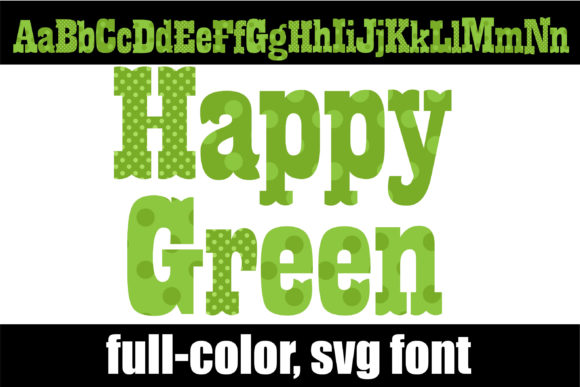
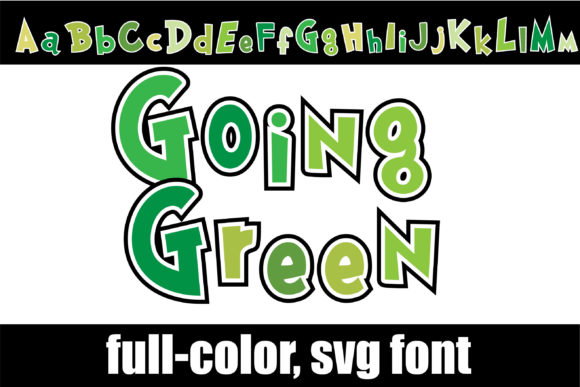
In the evolving landscape of graphic design, capturing attention requires more than just good ideas—it demands visual personality. The "Going Green" color font offers exactly that, injecting a youthful, whimsical energy into projects through its vibrant, green lettering. This isn't just a typeface; it's a creative asset designed to make your branding, marketing materials, and digital content stand out with a fresh, modern aesthetic that resonates with contemporary audiences.
Understanding Color Fonts in Your Design Workflow
Unlike traditional OTF or TTF files, "Going Green" is an OpenType-SVG color font. This technology embeds rich, multi-colored graphics directly into each glyph, allowing for complex gradients, textures, and intricate details that flat fonts cannot achieve. This feature is particularly valuable for designers seeking to bypass time-consuming manual edits in software like Illustrator or Photoshop. However, it's crucial to note compatibility: this font works seamlessly in PhotoShop, Illustrator, Silhouette, and Inkscape, but not with Cricut machines. Understanding these technical specifications ensures a smooth integration into your existing design workflow and prevents production bottlenecks.
Practical Applications Across Creative Projects
The true value of a resource like "Going Green" lies in its versatility. Its playful yet professional character makes it suitable for a wide range of applications where a touch of personality and visual hierarchy is needed.
- Branding and Logo Design: Use it to create memorable logos, brand marks, or monograms for companies targeting a youthful, eco-conscious, or creative market. The alternate characters accessible via your system's character map provide flexibility for unique customizations.
- Digital Marketing and Social Media: Craft eye-catching Instagram stories, Facebook ads, or YouTube thumbnails. The vibrant green palette naturally draws the eye, improving click-through rates and engagement on crowded social feeds.
- Packaging and Editorial Design: Apply it to product labels, book covers, or magazine headlines to instantly communicate a fun, energetic, or nature-inspired theme. The full-color design eliminates the need for multiple layers or complex color separations in print-ready files.
Tips for Effective Implementation
To maximize the impact of any creative asset, thoughtful application is key. Consider these guidelines when using color fonts like "Going Green":
- Ensure Readability: While decorative, prioritize legibility, especially for body text or critical information. Use it primarily for headlines, logos, or short calls-to-action.
- Maintain Brand Consistency: Align the font's vibrant green with your existing color palette. Use it as an accent rather than the sole brand color to maintain a cohesive visual identity across all touchpoints.
- Test for Scalability: View designs at various sizes to ensure the intricate details remain clear, whether on a small mobile screen or a large printed banner.
Ultimately, selecting the right typography is a fundamental aspect of effective visual communication. A resource like "Going Green" demonstrates how modern design tools can solve specific aesthetic challenges, offering designers a shortcut to achieving polished, professional results with significant visual impact. By investing in high-quality, compatible creative assets, professionals can streamline their process, ensure consistency, and deliver designs that truly connect with their intended audience, elevating both the aesthetics and the strategic message of every project.